I Turned My LinkedIn Data Export Into a Dashboard With Claude Code
I pointed Claude Code at my full LinkedIn data export and built one dashboard. Here is what 881 connections, 1,265 messages and LinkedIn's guesses revealed.
- Claude
- Claude Code
- Data Analysis
- Build in Public
- Data Visualisation
How to download your LinkedIn data
You request it from LinkedIn directly, and it is free. It takes about a minute to ask for, and roughly a day to arrive.
- On LinkedIn, open Settings and Privacy, then Data privacy.
- Choose Get a copy of your data.
- Select Download larger data archive. This is the important one. It includes your connections, your messages, your account history, and the data LinkedIn infers about you.
- Click Request archive.
Your download lands in your inbox in about 24 hours, as a folder of CSV files. That folder is what you point the prompt below at.
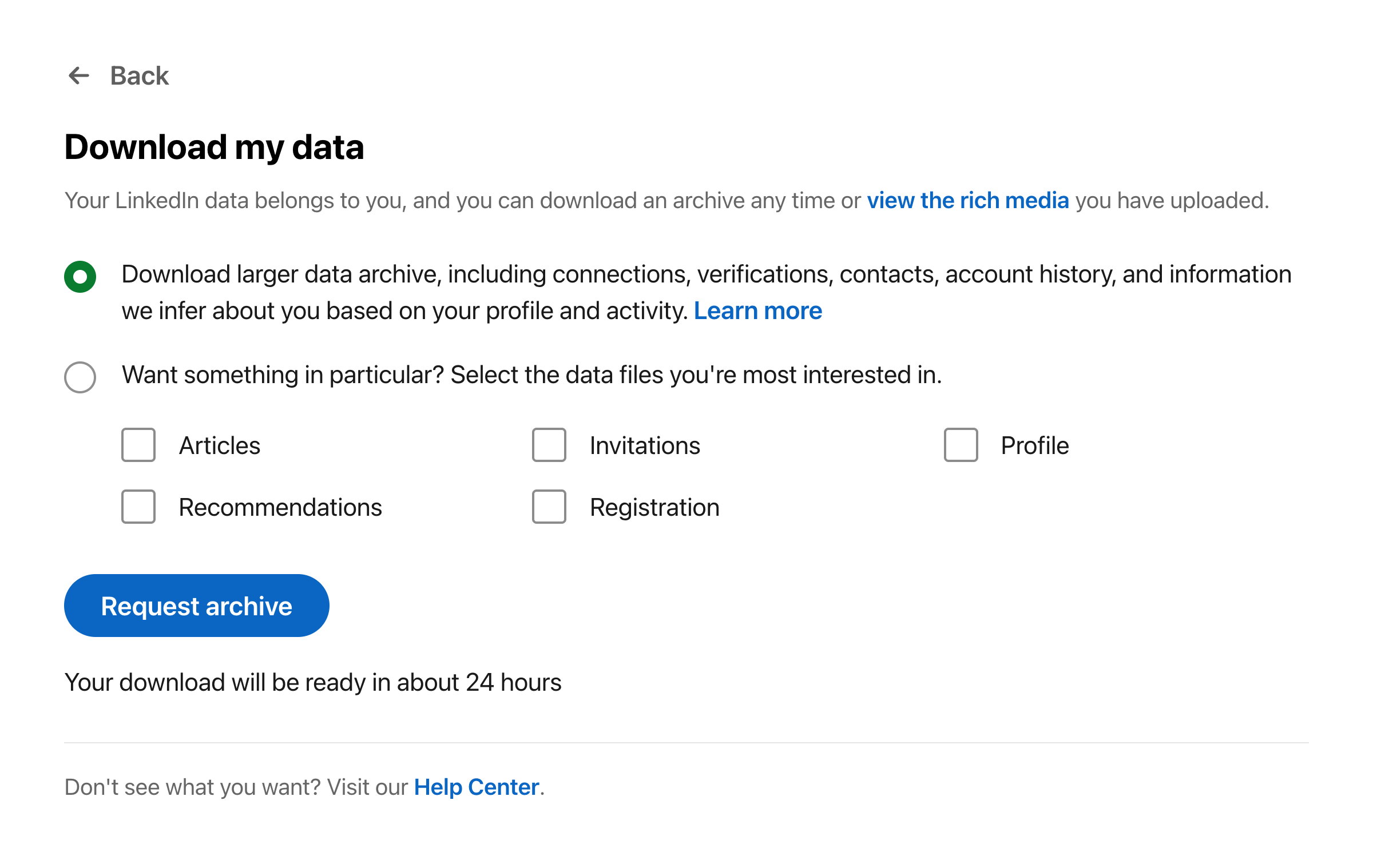 LinkedIn's Download my data screen. Choose the larger archive, then Request archive.
Build your own in one paste
You are my data analyst and front-end engineer. I have downloaded my full LinkedIn
data export (Settings, then Data privacy, then Get a copy of your data) into this
folder as a set of CSV files. Read all of them.

First, explore the files and tell me what each one holds and how many rows it has.
Watch for LinkedIn's quirks: Connections.csv has a few "Notes" lines before the real
header, dates appear in several different formats across files, and messages.csv has
quoted fields that wrap across multiple lines.

Then build me a single, self-contained HTML dashboard that opens in any browser with
no server and no build step. Embed all the data as JSON inside the file. Use Chart.js
for the charts and D3.js for an interactive, force-directed network graph. Style it
cleanly: a light background, the Inter font, and a muted, professional colour palette.

Include these sections:
- Headline numbers: connections, distinct companies, messages, endorsements,
  companies followed, job applications.
- My network as a force-directed graph, with people clustered around their current
  employer and the largest clusters labelled.
- How my network grew, by year, grouped into the eras of my career.
- Real relationships vs names I have collected: cross-reference Connections.csv
  against messages.csv to see how many I have actually spoken to.
- Inbound vs outbound: how many people invited me compared with how many I invited
  (Invitations.csv).
- Messaging over time, and a rough split of genuine messages vs spam or sales pitches.
- The people I message the most.
- Unanswered messages that look like real opportunities, so I can spot the ones I let
  go cold.
- The companies I follow, grouped into themes.
- What LinkedIn infers about me for advertisers (Ad_Targeting.csv), shown beside my
  real skills, so I can see how out of date its picture of me is.
- Skills and endorsements, job application history, and learning activity.

Make it reproducible: do the whole thing in a single Python script that regenerates
the HTML, so I can re-run it after a future export. Add a flag that fully anonymises
the output, swapping every person's name, every employer and every message for a
synthetic stand-in, so I can share screenshots without exposing anyone.

Keep everything local and treat the data as sensitive. It holds other people's names
and my private messages. Do not send any of it anywhere.

Work through the files first, show me what you found, then build the dashboard.The rest of this post is what that prompt pulled out of my own data.
I downloaded everything LinkedIn holds on me, all fifty-odd CSV files, and pointed Claude Code at the folder. A few hours later I had a single dashboard that read my own career back to me. Some of it was useful. Some of it stung. The strangest part was realising that LinkedIn still has me filed as someone I stopped being years ago.
Before I moved into safety, I worked as a high-performance computing, networks and machine-learning engineer. These days I turn safety data into decisions for a living. This was the same move, pointed at my own data instead of an organisation's. Here is what the export contained, what it showed me, and how you can build your own.
What is actually in a LinkedIn data export?
Far more than the app ever shows you. You request it under Settings and Privacy, then Data privacy, then Get a copy of your data. A day later you get a zip of CSV files, one per slice of your activity.
Mine held more than fifty. Connections, each stamped with the date we connected. Every message I have sent or received. Invitations, with their direction. Endorsements given and received. The companies I follow. My job applications and saved searches. My learning history. And a file called Ad Targeting, which turned out to be the most revealing of the lot.
The headline numbers alone were a reminder of how much accumulates quietly: 881 connections going back to 2018, 1,265 messages, 359 endorsements, 217 job applications, 68 company follows.
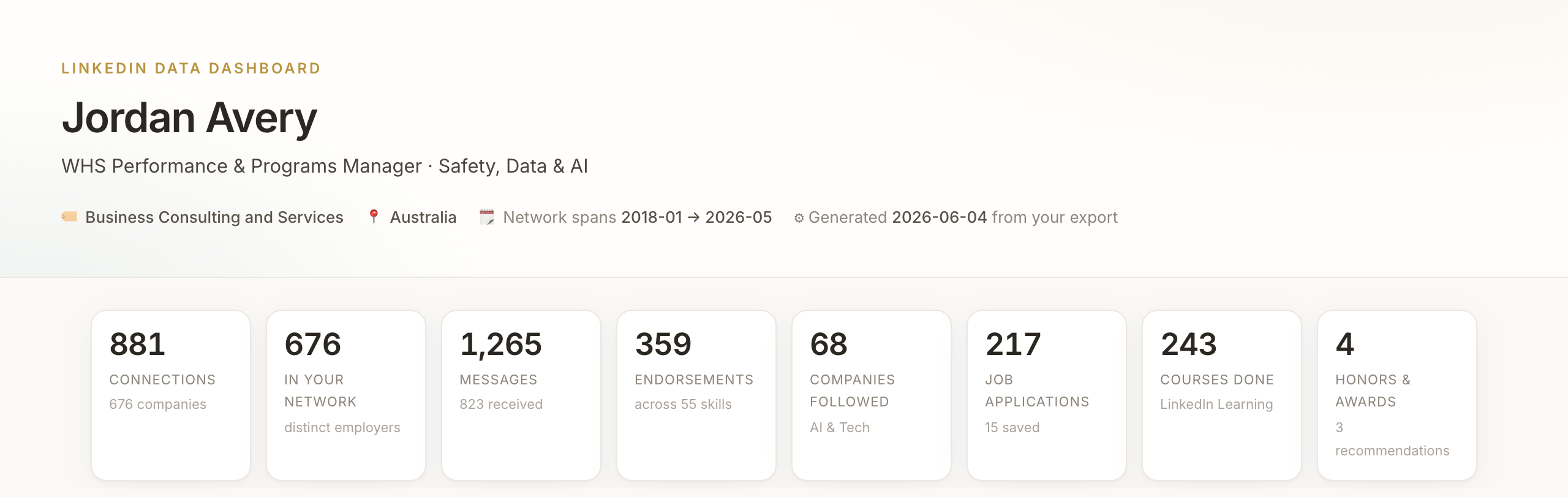 An anonymised view of the finished dashboard. Every name, employer and message in these screenshots has been replaced with a synthetic stand-in.
What I built, and how
One self-contained HTML file that opens in any browser, with no server required. The charts come from Chart.js, the network graph from D3, and a single Python script reads the CSV files and writes the whole page. Because it is a script and not a one-off, I can re-run it whenever I refresh my export, and every number updates.
The Claude Code workflow was conversational, not clever. I pointed it at the folder and started asking. What is in here. Show me the patterns. What would be worth visualising. We went back and forth, and it absorbed the boring eighty per cent that usually kills a project like this: the slightly different date format in every file, the notes preamble LinkedIn pastes above the real header, the messages that wrap across many lines. I made the calls on what mattered. It did the parsing and the plumbing.
Getting the design right took maybe a dozen rounds of "smaller, clearer, show me the real number." That iteration is the part Claude Code is genuinely good at, turning a vague "make this better" into another concrete revision in seconds. One file is the other quiet advantage. It opens offline, it travels in an email, and nobody needs to install anything to read it.
The result groups my connections into a kind of map. Each cluster is an employer, sized by how many people I know there. It is the first time my network has looked like a shape rather than a number.
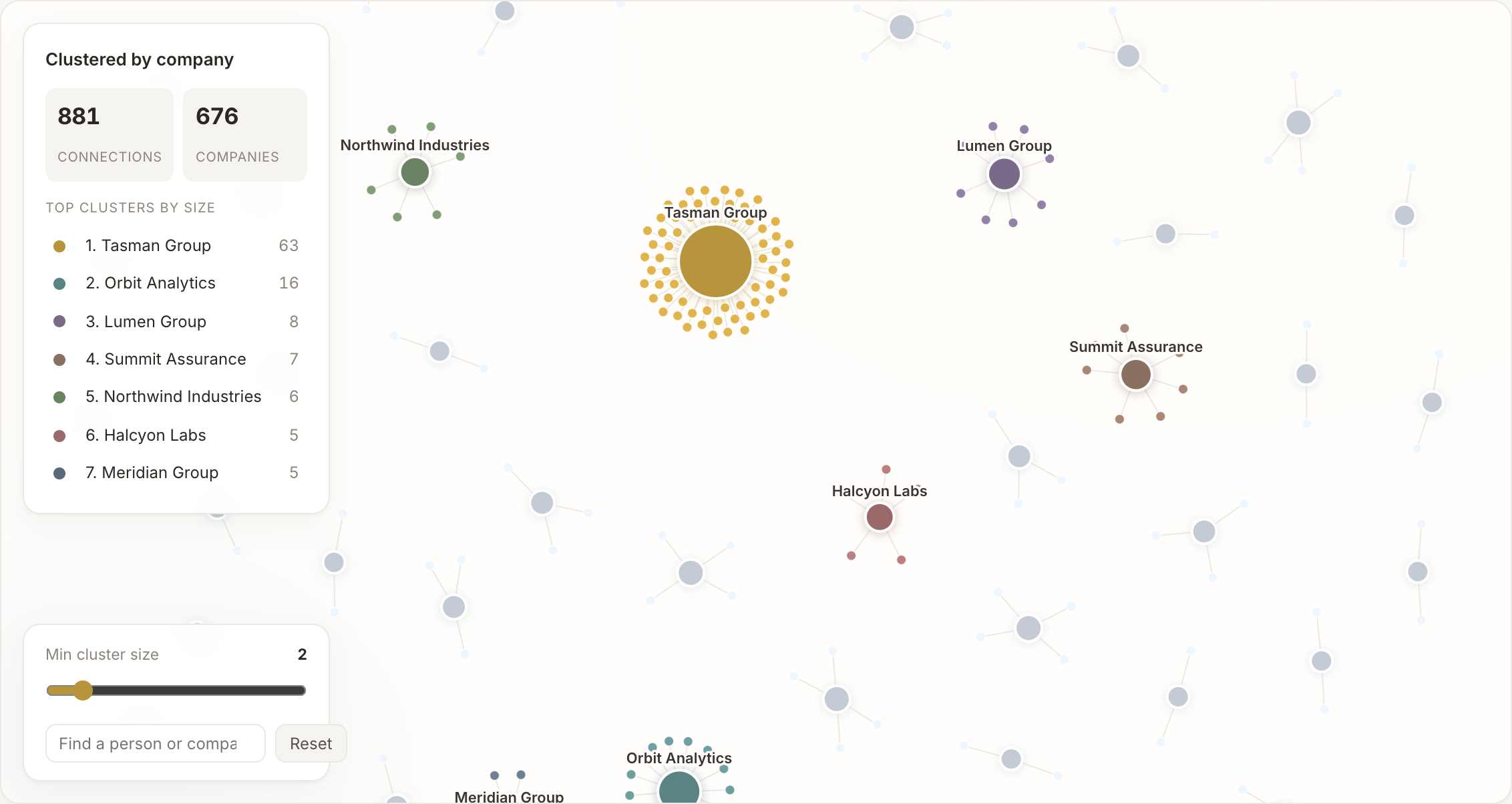 Connections clustered by employer. The clusters are real; the company names here are synthetic.
What did the data actually tell me?
That a connection count is a vanity metric. Of my 881 connections, I have exchanged a message with roughly 120. Just 15 are people I have spoken to more than a handful of times this year. The other 758, about 86 per cent, I have never messaged once. They are names I collected, not relationships I built.
| Category | Value |
|---|---|
| Never messaged | 758 |
| Messaged at least once | 108 |
| Talk to regularly this year | 15 |
A few other things surfaced. People find me more than I chase them, with incoming requests outnumbering the ones I send by about one and a half to one. My network also grew in waves that match the chapters of my career: a busy early stretch around 2018 to 2020, a quiet few years, then a sharp resurgence as I started building in public.
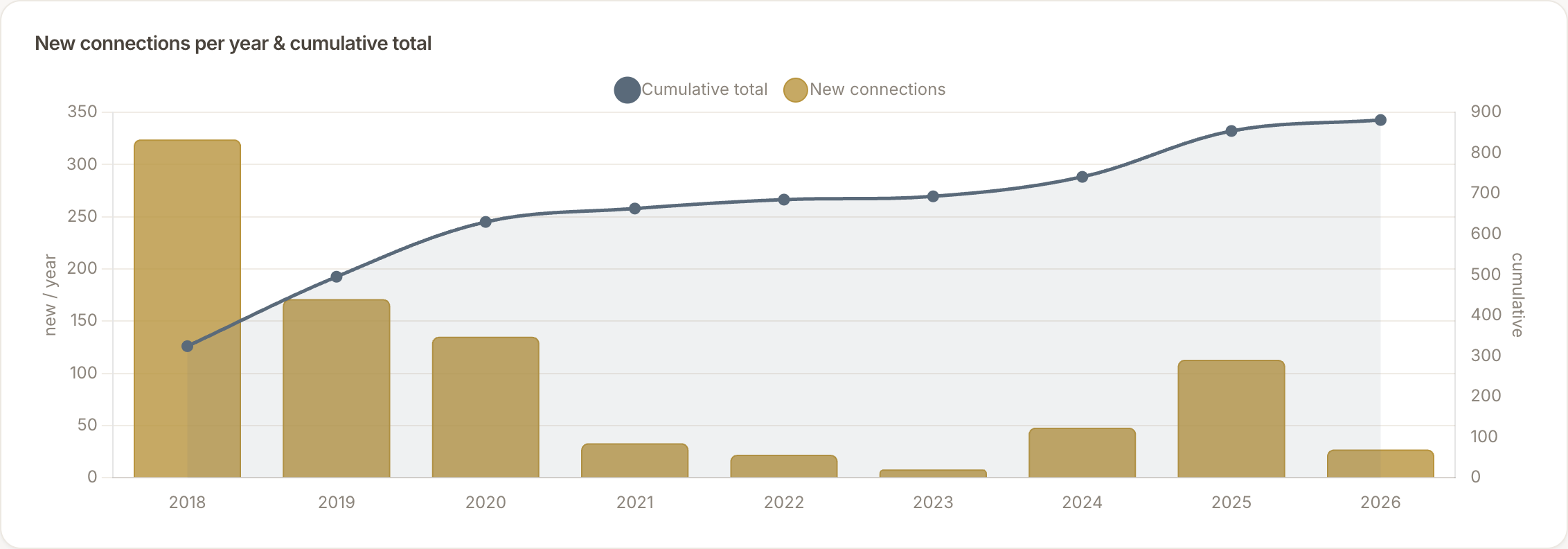 Connections added per year. The shape is real; it tracks the chapters of my career rather than any deliberate networking.
A search through my inbox turned up eight genuine messages I never replied to, the kind that look like real introductions rather than pitches. One was a warm introduction from a mutual contact, sitting unanswered for months. The dashboard surfaced them as candidates worth a second look, not as a verdict.
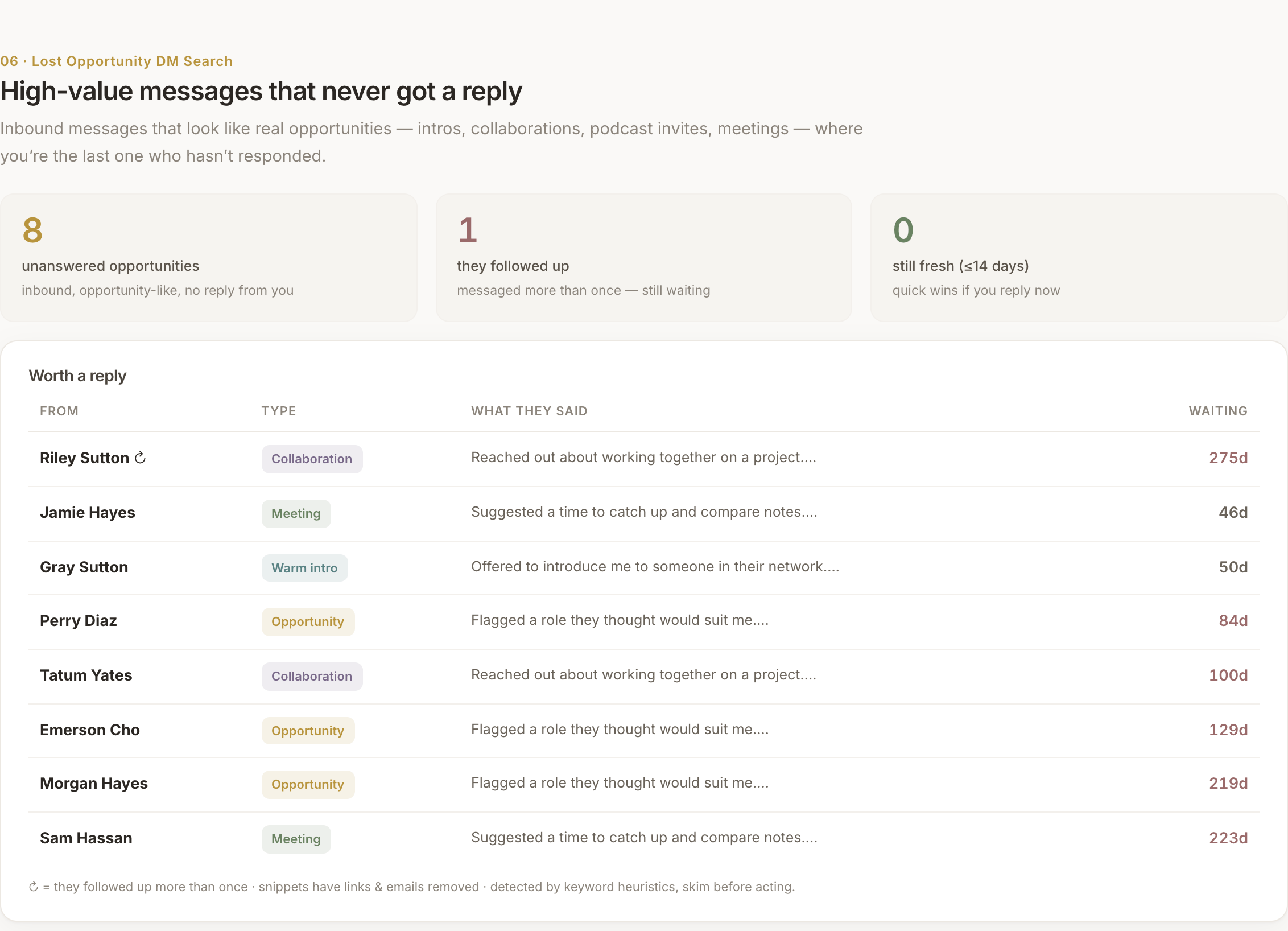 Messages that look like real introductions but never got a reply. Detected by keyword, so treat each as a prompt to look closer. Names and text are synthetic here.
The companies I follow turned out to be a more honest signal of what I care about than anything LinkedIn inferred. They cluster into a few clear themes, and the three that lead are safety, applied AI, and the infrastructure world I work in now. That is a fair description of where my attention actually goes, and notably none of it is the field LinkedIn still thinks I am in.
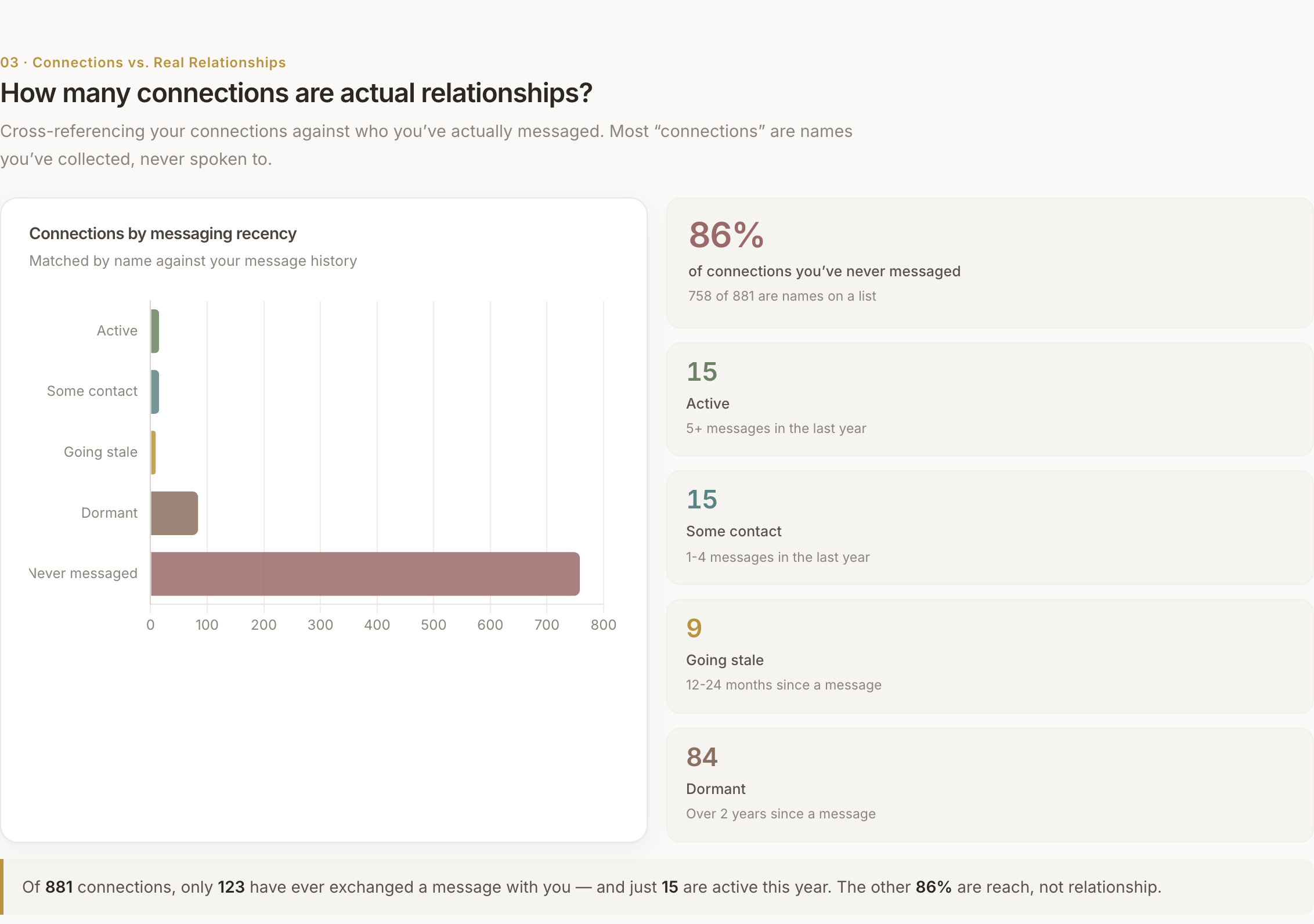 The same split, as it appears in the dashboard itself. The proportions are real; the underlying names are not shown.
LinkedIn thinks I am someone else
It still has me filed as the engineer I used to be. The Ad Targeting file is where LinkedIn records what it has inferred about you for advertisers, and mine reads like my old CV. It lists my likely job titles as Network Engineer, HPC Engineer and Machine Learning Engineer. It lists my skills as high-performance computing, network design, distributed systems, and the rest of the stack I left behind. None of it is wrong, exactly. It is just years out of date.
Why does it lag so badly? Because these inferences lean heavily on endorsements, and almost all of mine sit on my old engineering skills. To put a number on it, my 359 endorsements come from only about sixteen people, mostly former colleagues, and they cluster on the work I did a decade ago. My safety work is newer and thinner in the data, so the older identity keeps winning. The system is not broken. It is weighting my past more heavily than my present, and it has no reason to know I moved on.
It also, for reasons I cannot account for, has me down as an Automotive Enthusiast.
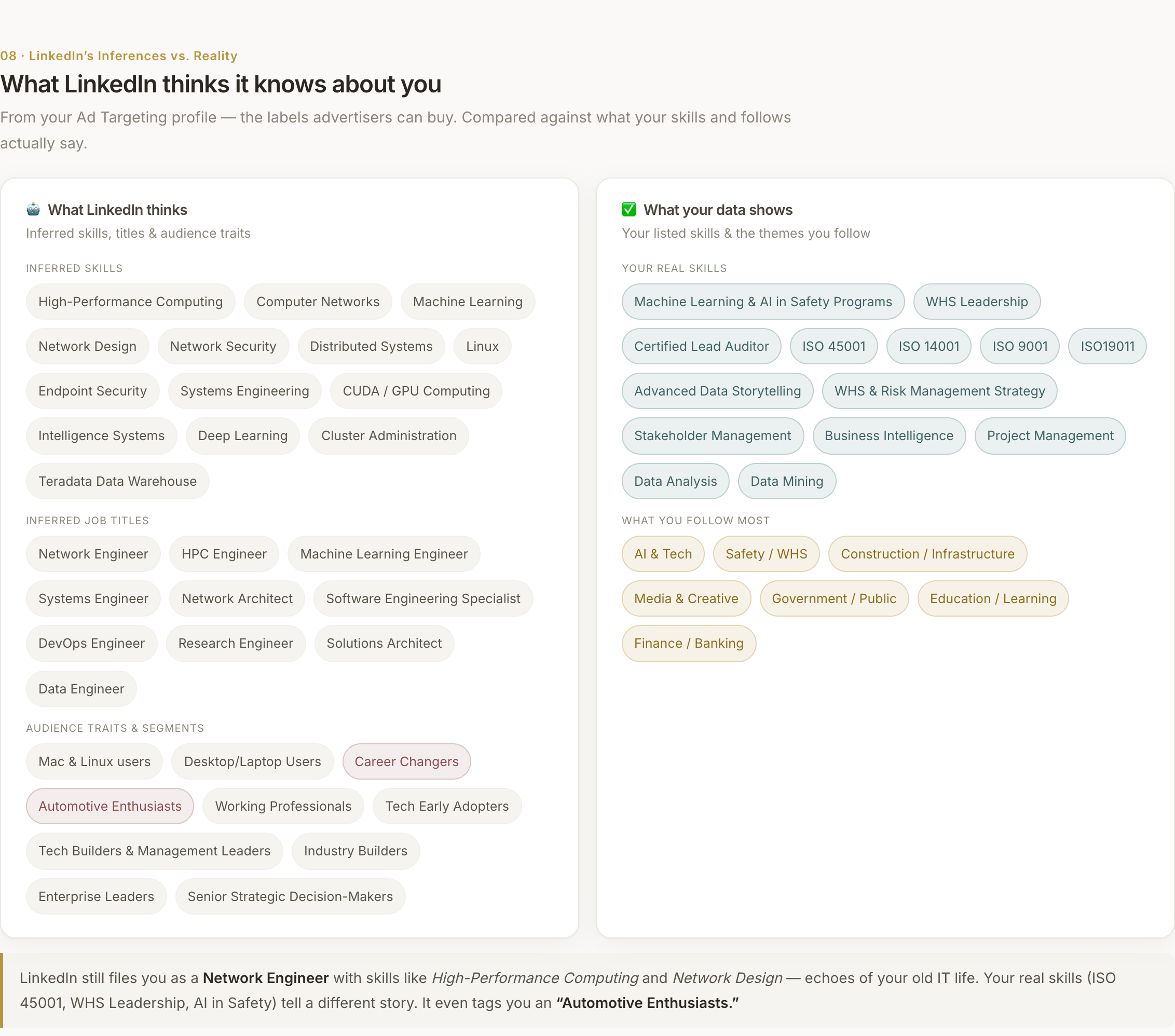
Left, what LinkedIn infers. Right, what my actual skills and follows say. The gap is the whole story.
The part worth keeping
That is the quiet lesson under the novelty. The same tool that made my data legible would just as happily have let me believe its most confident, most out-of-date conclusion. Get the inputs right first, then visualise.
How to build your own
You need less than you think. Four steps carried the whole project.
- Export your data. Settings and Privacy, then Data privacy, then Get a copy of your data. Ask for the full archive.
- Point Claude Code at the folder. Ask what is in there, ask for the patterns, then ask it to build one dashboard. Iterate in plain language.
- Keep it local. The export holds other people's names and your private messages. Mine never left my machine.
- Anonymise before you share. I added a pass to the script that swaps every name and employer for a synthetic one and strips the message text, which is why the screenshots here show real shapes and no real people.
One honest caveat. First-party data is the most trustworthy kind, but some of what the dashboard shows is still inferred. Matching connections to messages is done by name, and the list of missed opportunities is detected by keyword. Treat those as prompts to look closer, not as settled facts.
I build things like this for safety teams more deliberately. If that is closer to your work, I have written about encoding the WHS Act into an AI skill and a broader field guide to AI in workplace safety. This one was just me, a weekend, and a folder of CSVs.
If you build your own, I would like to see what your data says about you. Reach out, I am curious whether yours knows you as well as it thinks it does.
Frequently asked questions
- How do I download my LinkedIn data?
- In LinkedIn, go to Settings and Privacy, then Data privacy, then Get a copy of your data. Choose the full archive. It arrives as a set of CSV files, usually within 24 hours.
- What can you actually learn from a LinkedIn export?
- Your connection growth over time, who you really talk to versus who is just a name, the companies you follow, your endorsement history, and the ad-targeting attributes LinkedIn infers about you.
- What did you use to build the dashboard?
- Claude Code for the analysis and code, a single Python script to parse the CSV files, and Chart.js plus D3.js for the visuals. The output is one HTML file that runs offline.
- Is it safe to put my LinkedIn data into an AI tool?
- Treat it as sensitive. It contains other people's names and your private messages. I kept everything local and fully anonymised every screenshot before publishing. Do the same before you share anything.
- Why does LinkedIn's profile of me look out of date?
- Its inferences are weighted by historical signal, especially endorsements. If your older career is denser in the data than your current one, the older identity wins until you actively rebalance it.